Connect Your AI
Your CRM, inside Claude, ChatGPT or Grok Bot.
Plug Client Keeper into the AI you already use. Add a contact just by saying it, and ask about your clients, pipeline and to-dos in plain language.
 Claude
 ChatGPT
 Grok Bot
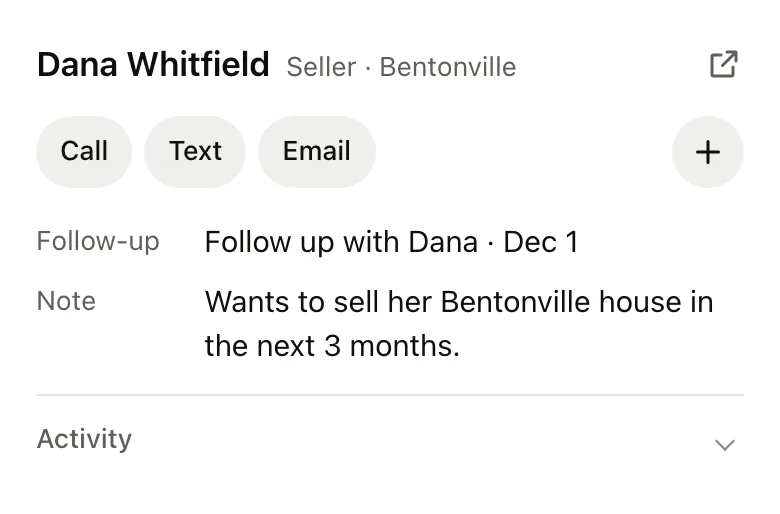
Add Dana Whitfield as a new contact. She wants to sell her Bentonville house in the next 3 months. Follow up next Tuesday.
Done. Dana is in as a seller, with a follow-up set for Tuesday, Dec 1.
30-day trial.
What you can ask it to do.
Look things up
Find a contact by name, phone or email. See birthdays, housiversaries and follow-ups coming up, and who you haven't talked to in a while.
See it laid out
Your Today board, pipeline, closing timeline, lead inbox and follow-up planner appear as cards in the chat.
Match buyers to homes
Search properties and see which of your buyers they fit.
Get work done
Add contacts, follow-ups, to-dos and notes, update a transaction, and draft power texts.
Connect with the one you use.
You sign in to Client Keeper once and approve the access.
Claude
- Open Settings, then Connectors.
- Search for Client Keeper and select Connect.
- Sign in to Client Keeper and select Allow.
ChatGPT
- Open Plugins.
- Find Client Keeper Real Estate CRM and select Connect.
- Sign in to Client Keeper and select Allow.
Grok Bot
- Open the connectors settings.
- Add Client Keeper with the address in the guide.
- Sign in to Client Keeper and select Allow.
You stay in charge.
You approve the access.
You sign in to Client Keeper and choose what the assistant may read and change.
Deletes always ask first.
You see what will be removed and nothing goes until you say yes.
Texts stay drafts.
The assistant can write power texts. You review and send them yourself.
Disconnect any time.
Remove Client Keeper in your assistant's settings, or email us and we revoke it from our side.
Questions.
Which AI assistants does it work with?
Claude, ChatGPT and Grok Bot are tested and working. It also works with any MCP-compatible assistant.
What do I need?
An active Client Keeper account and an AI plan that supports connectors or plugins. On a work plan, an admin may need to allow it first.
Can it change my data?
Only if you allow it when you connect. With read access the assistant can look things up. With write access it can add and update records.
Where does my data go?
Your data stays in Client Keeper. The assistant reads and changes it only through the connection you approve. What you type in the chat is handled by that assistant's maker under its own terms.
Is this the same as MYRA?
No. MYRA is the assistant built into Client Keeper. This lets you use Client Keeper from an AI app you already have.